Previously we looked at the big picture of Solidity and the create-eth-app which already mentioned TheGraph before. This time we will take a closer look at TheGraph which essentially became part of the standard stack for developing Dapps in the last year.
But let's first see how we would do things the traditional way...
Without TheGraph...
So let's go with a simple example for illustration purposes. We all like games, so imagine a simple game with users placing bets:
// Historical event illustration only: evaluateBetForPlayer is intentionally
// undefined. This is not a complete or safe gambling contract.
pragma solidity 0.7.1;

contract Game {
    uint256 public totalGamesPlayerWon = 0;
    uint256 public totalGamesPlayerLost = 0;
    event BetPlaced(address player, uint256 value, bool hasWon);

    function placeBet() external payable {
        bool hasWon = evaluateBetForPlayer(msg.sender);

        if (hasWon) {
            (bool success, ) = msg.sender.call{ value: msg.value * 2 }('');
            require(success, "Transfer failed");
            totalGamesPlayerWon++;
        } else {
            totalGamesPlayerLost++;
        }

        emit BetPlaced(msg.sender, msg.value, hasWon);
    }
}- Fetch
totalGamesPlayerWon. - Fetch
totalGamesPlayerLost. - Subscribe to
BetPlacedevents.
We can listen to the event in Web3 as shown on the right, but it requires handling quite a few cases.
GameContract.events.BetPlaced({
    fromBlock: 0
}, function(error, event) { console.log(event); })
.on('data', function(event) {
    // event fired
})
.on('changed', function(event) {
    // event was removed again
})
.on('error', function(error, receipt) {
    // tx rejected
});
For per-player statistics, we can reconstruct the counts from the existing BetPlaced logs, including historical logs, without redeploying the contract. But now our frontend needs to retrieve, decode, deduplicate and update those records. A dedicated indexer makes this easier as the data model grows.

The tradeoff is where to maintain the derived data. Extra on-chain counters cost gas; processing logs in every frontend duplicates work and needs reorg handling. An indexer can serve a reusable query model for already deployed contracts that emit the necessary data.

Now let's look at a better solution.
Let me introduce you to GraphQL
First let's talk about GraphQL, originally designed and implemented by Facebook. You might be familiar with the traditional Rest API model. Now imagine instead you could write a query for exactly the data that you wanted:

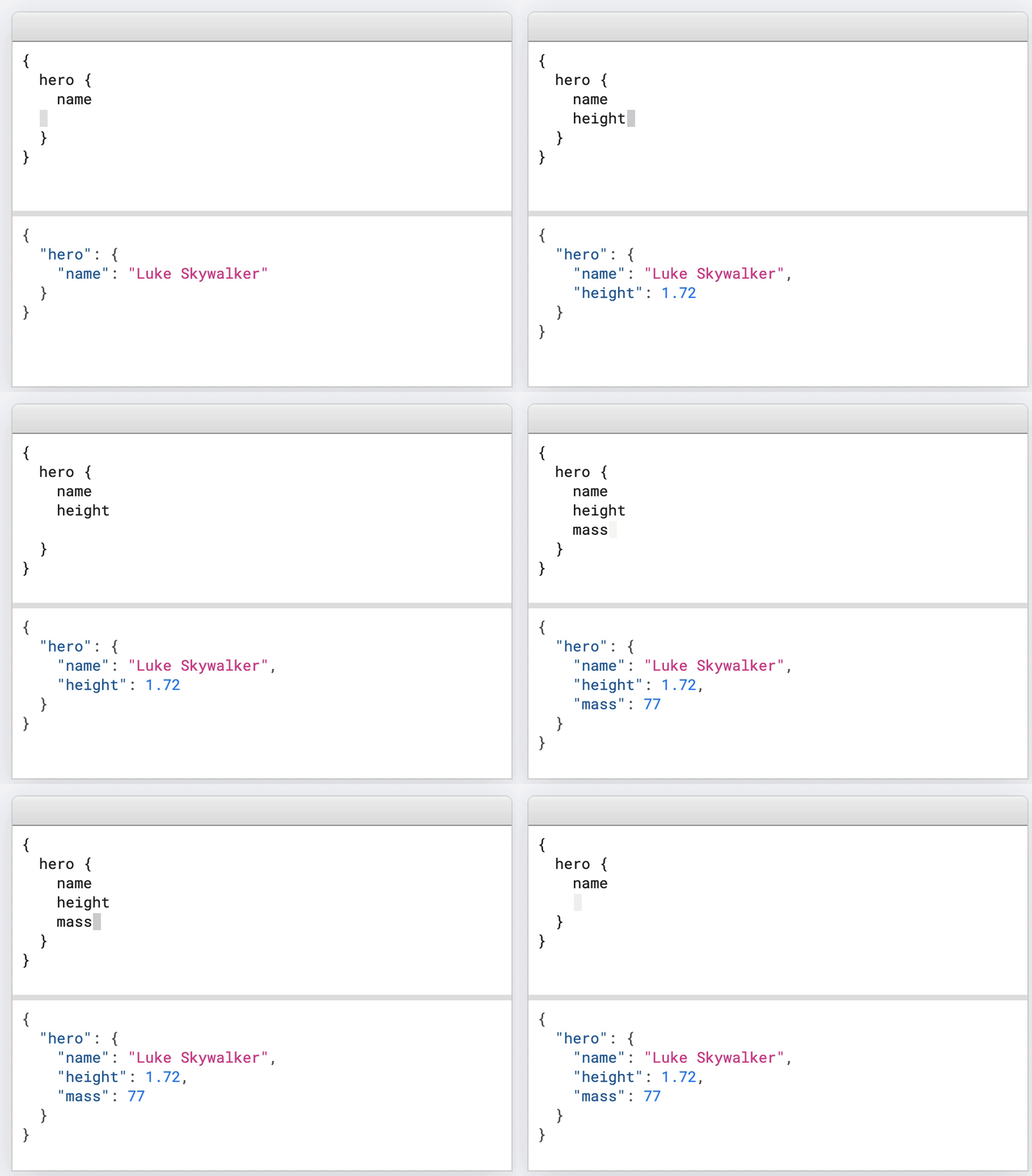
The two images pretty much capture the essence of GraphQL. With the query on the right we can define exactly what data we want, so there we get everything in one request and nothing more than exactly what we need. A GraphQL server handles the fetching of all data required, so it is incredibly easy for the frontend consumer side to use. This is a nice explanation of how exactly the server handles a query if you're interested.
Now with that knowledge, let's finally jump into blockchain space and TheGraph.
What is TheGraph?
A blockchain is a decentralized database, but in contrast to what's usually the case, we don't have a query language for this database. Solutions for retrieving data are painful or completely impossible. TheGraph is a decentralized protocol for indexing and querying blockchain data. And you might have guessed it, it's using GraphQL as query language.

Examples are always the best to understand something, so let's use TheGraph for our GameContract example.
How to create a Subgraph
The definition for how to index data is called subgraph. It requires three components:
- Manifest (subgraph.yaml)
- Schema (schema.graphql)
- Mapping (mapping.ts)
Manifest (subgraph.yaml)
- which smart contracts to index (address, network, ABI...)
- which events to listen to
- other things to listen to like function calls or blocks
- the mapping functions being called (see mapping.ts below)
You can define multiple contracts and handlers here. A typical setup would have a subgraph folder inside the Truffle/Buidler project with its own repository. Then you can easily reference the ABI.
For convenience reasons you also might want to use a template tool like mustache. Then you create a subgraph.template.yaml and insert the addresses based on the latest deployments. For a more advanced example setup, see for example the Aave subgraph repo.
And the full documentation can be seen here: https://thegraph.com/docs/define-a-subgraph#the-subgraph-manifest.
specVersion: 0.0.1
description: Placing Bets on Ethereum
repository: - Github link -
schema:
  file: ./schema.graphql
dataSources:
  - kind: ethereum/contract
    name: GameContract
    network: mainnet
    source:
      address: '0x2E6454...cf77eC'
      abi: GameContract
      startBlock: 6175244
    mapping:
      kind: ethereum/events
      apiVersion: 0.0.1
      language: wasm/assemblyscript
      entities:
        - GameContract
      abis:
        - name: GameContract
          file: ../build/contracts/GameContract.json
      eventHandlers:
        - event: BetPlaced(address,uint256,bool)
          handler: handleNewBet
      file: ./src/mapping.ts
Schema (schema.graphql)
The schema is the GraphQL data definition. It will allow you to define which entities exist and their types. Supported types from TheGraph are
BytesIDStringBooleanIntBigIntBigDecimal
You can also use entities as type to define relationships. In our example we define a 1-to-many relationship from player to bets. The ! means the value can't be empty. The full documentation can be seen here: https://thegraph.com/docs/define-a-subgraph#the-graphql-schema.
type Bet @entity {
  id: ID!
  player: Player!
  playerHasWon: Boolean!
  time: Int!
}

type Player @entity {
  id: ID!
  totalPlayedCount: Int!
  hasWonCount: Int!
  hasLostCount: Int!
  bets: [Bet!]!
}
Mapping (mapping.ts)
The mapping file in TheGraph defines our functions that transform incoming events into entities. It is written in AssemblyScript, a subset of Typescript. This means it can be compiled into WASM (WebAssembly) for more efficient and portable execution of the mapping.
You will need to define each function named in the subgraph.yaml file, so in our case we need only one: handleNewBet. We first try to load the Player entity from the sender address as id. If it doesn't exist, we create a new entity and fill it with starting values.
Then we create a new Bet entity. The id for this will be event.transaction.hash.toHex() + "-" + event.logIndex.toString() ensuring always a unique value. Using only the hash isn't enough as someone might be calling the placeBet function several times in one transaction via a smart contract.
Lastly we can update the Player entity will all the data. Arrays cannot be pushed to directly, but need to be updated as shown here. We use the id to reference the bet. And .save() is required at the end to store an entity.
Use the event’s player parameter for attribution; the top-level transaction sender can be a different address. For a growing history, prefer a @derivedFrom relationship over continually rewriting an unbounded array. The old manifest contains a placeholder address and old API versions; generate current files together with the CLI.
The full documentation can be seen here: https://thegraph.com/docs/define-a-subgraph#writing-mappings. You can also add logging output to the mapping file, see here.
import { Bet, Player } from '../generated/schema';
import { BetPlaced }
    from '../generated/GameContract/GameContract';

export function handleNewBet(event: BetPlaced): void {
  let player = Player.load(
    event.params.player.toHex()
  );

  if (player == null) {
    // create if doesn't exist yet
    player = new Player(event.params.player.toHex());
    player.bets = new Array<string>(0);
    player.totalPlayedCount = 0;
    player.hasWonCount = 0;
    player.hasLostCount = 0;
  }

  let bet = new Bet(
    event.transaction.hash.toHex()
        + '-'
        + event.logIndex.toString()
  );
  bet.player = player.id;
  bet.playerHasWon = event.params.hasWon;
  bet.time = event.block.timestamp.toI32();
  bet.save();

  player.totalPlayedCount++;
  if (event.params.hasWon) {
    player.hasWonCount++;
  } else {
    player.hasLostCount++;
  }

  // update array like this
  let bets = player.bets;
  bets.push(bet.id);
  player.bets = bets;

  player.save();
}
Using it in the Frontend
// See all subgraphs: https://thegraph.com/explorer/
const client = new ApolloClient({
  uri: "{{ subgraphUrl }}",
});

ReactDOM.render(
  <ApolloProvider client={client}>
    <App />
  </ApolloProvider>,
  document.getElementById("root"),
);const { loading, error, data } = useQuery(myGraphQlQuery);
React.useEffect(() => {
if (!loading && !error && data) {
console.log({ data });
}
}, [loading, error, data]);And now we can write for example a query like this. This will fetch us
- how many times current user has won
- how many times current user has lost
- a list of timestamps with all his previous bets
All in one single request to the GraphQL server.
const myGraphQlQuery = gql`
  query PlayerHistory($currentUser: ID!) {
    players(where: { id: $currentUser }) {
      totalPlayedCount
      hasWonCount
      hasLostCount
      bets { time }
    }
  }
`;
// Pass variables: { currentUser: address.toLowerCase() } to useQuery.

But we're missing one last piece of the puzzle and that's the server. You can either run it yourself or use the hosted service.
TheGraph server
Graph Explorer: The hosted service
The old hosted service is no longer active as of June 12, 2024. Use Subgraph Studio and The Graph Network for current deployment and query endpoints, or run your own Graph Node.

Running your own node
You can run your own Graph Node. Network support depends on the selected node and indexing features; the old Kovan, Rinkeby, Ropsten and other hosted-service list is historical.
The decentralized future
The decentralized Graph Network is live, and the hosted-service transition is complete. Indexers stake GRT and serve queries under the network’s rules. GraphQL’s general support for subscriptions does not mean a particular Graph Node endpoint supports them; use its documented query capabilities instead of relying on the old “coming soon” claim.




Join the conversation
Comments are hosted by Disqus and load only when you choose to enable them.